Motor noise
Listen for hum, buzzing, or a faint electrical tone. These sounds can be more annoying than plain airflow, especially at night when the room is otherwise quiet.
Quiet fans
A fan can be technically quiet and still annoy you if it rattles, pulses, whines, or changes tone all night. For sleep and work, the best quiet fan is usually the one that moves enough air on a low setting and stays steady while it does it.
Motor quality, blade design, speed control, vibration, placement, and cleaning all matter. A quiet fan is a whole design, not just a number on a box.
On this page
Quiet fan shopping can get confusing because every brand wants to sound peaceful. The useful question is simpler: what actually makes a fan sound better in real life?
This page looks at motors, blades, speed settings, vibration, fan types, bedroom comfort, and the small details that decide whether a fan is easy to sleep with or just another noisy object in the room.
How quiet fans work
The first part is the motor. A smoother motor usually means less hum, less vibration, and better control at lower speeds. Many quiet ceiling fans and premium room fans use DC or brushless-style motors because they can run more smoothly and offer finer speed control than simple older designs.
The second part is the airflow. A fan blade does not just move air. It also cuts through air, creates turbulence, and can make a rushing or choppy sound if the design is not great. Better blade shape, a cleaner grille, and a sensible fan speed can make the sound softer and less harsh.
The third part is vibration. A fan can have a decent motor and still sound cheap if the stand shakes, the housing buzzes, or the blades are unbalanced. That is why stable construction matters so much, especially for pedestal fans, desk fans, and ceiling fans.
Listen for hum, buzzing, or a faint electrical tone. These sounds can be more annoying than plain airflow, especially at night when the room is otherwise quiet.
Some sound is normal when a fan moves air. What you want is a smooth, even airflow sound instead of chopping, pulsing, or a harsh rush at every speed.
Rattles, wobble, and buzzing panels usually make a fan feel louder than it should. This is where build quality and placement can make a big difference.
Noise ratings
Fan noise is often listed in decibels, usually as dB or dB(A). That number is useful, but it is not magic. A fan measured from a different distance, at a different speed, or in a different room can be hard to compare fairly.
Also, two fans can have a similar noise rating and still feel different. A soft, steady air sound may disappear into the background. A thin whine or small repeating click can be hard to ignore even if the number looks fine.
For sleep, the low-speed sound matters more than the maximum speed sound. Most people do not run a fan at full power all night unless the room is really hot.
The quietest useful setting is often more important than the loudest setting.
A hum, buzz, click, or high note can be more annoying than a smooth airflow sound.
Bedroom use
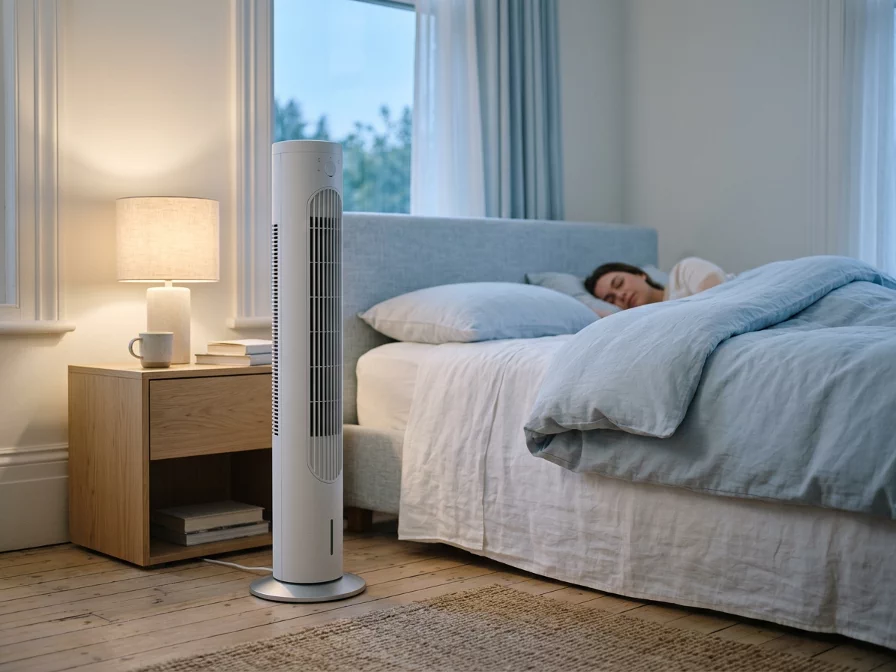
A bedroom fan has to be comfortable for hours. That means gentle airflow, a stable low setting, and a sound that does not keep changing. A fan that starts quiet but clicks every time it oscillates is not a good sleep fan. Neither is one with bright lights that cannot be dimmed.
Timers, sleep modes, dimmed displays, and remote controls can matter more at night than they seem to in the store. You do not want to get out of bed just to lower the speed or turn off a glowing panel.
For many bedrooms, tower fans are popular because they are slim and easy to place. Quiet pedestal fans can work well too, especially when you need more airflow. Ceiling fans can be excellent for gentle room circulation, but only if the installation is solid and the fan is balanced.
Can it run quietly on a low setting?
Does it have a sleep mode or timer?
Can any display lights be dimmed or turned off?
Does oscillation stay smooth without clicking?
Is the airflow gentle enough for overnight use?
Fan types
There is no single fan type that is always quiet. A good tower fan can be calmer than a cheap pedestal fan. A good pedestal fan can move enough air at a lower speed and sound better than a small fan working too hard. The model matters.
Still, the category can point you in the right direction. Tower fans are often chosen for bedrooms because they are slim and commonly come with timers and sleep modes. Ceiling fans can be very comfortable because they spread airflow across the room instead of blasting one spot. Desk fans are useful for close personal airflow, but cheap ones can buzz or rattle on a desk.
Often a good bedroom starting point. Look for a steady low speed, quiet oscillation, a timer, and controls that do not light up the room all night.
Good when you need more airflow. They can be quiet if the stand is stable, the motor is smooth, and you do not need to run them at full speed.
Often comfortable for sleep because the airflow is broad. Balance, installation, and motor quality matter a lot here.
Best for close-range airflow. For quiet use, avoid flimsy models that buzz on the desk or need high speed to feel useful.
They can look cleaner and feel modern, but quietness depends on the model and speed. Do not assume bladeless automatically means silent.
Hand fans and neck fans are close to your ears, so tone matters. A small high-pitched fan can be more annoying than a larger room fan farther away.
Placement and care
A fan on a wobbly table can sound worse than it really is. A pedestal fan on uneven flooring may vibrate. A desk fan pushed against loose objects can create little rattles. Even a ceiling fan can become distracting if it is not balanced properly.
Cleaning matters too. Dust on blades, grilles, and vents can disturb airflow and make the fan work harder. It can also create a rougher sound over time. A quick clean is not exciting, but it is one of the simplest ways to keep a fan sounding normal.
Keep the intake and airflow path clear. A fan sounds worse when it is fighting nearby surfaces or clutter.
Use a steady surface, avoid loose contact points, and check for rattles before blaming the motor.
Common mistakes
The first mistake is buying only by the lowest noise number. That number may be measured on the lowest setting, but the lowest setting may not move enough air for your room. A fan that is quiet but useless is still the wrong fan.
The second mistake is choosing a small fan for a job that needs a bigger one. Small fans often need higher speed to feel effective, and higher speed usually means more noise. A larger fan running gently can sometimes feel calmer than a tiny fan working hard.
The third mistake is ignoring the sound character. A bit of steady airflow can be fine. A repeating tick, a rattling grille, or a high-pitched motor sound can ruin the whole experience, even if the fan is not technically loud.
A fan that moves air will make some sound. The goal is a sound you can live with, not complete silence.
A stronger fan is not always better. Too much direct airflow in a bedroom can feel uncomfortable at night.
Fine speed steps, timers, and display dimming can matter more than they seem, especially for sleep.
Quick takeaway
If a fan has to run at full speed to be useful, it probably will not feel quiet for long. Look for a fan that moves enough air on lower settings, sits firmly, oscillates smoothly, and does not add little mechanical noises on top of the normal airflow sound.
For sleeping, the details matter: low-speed comfort, a soft sound profile, timer options, no bright display, and no clicking while it moves. That is usually what separates a fan that sounds good for five minutes from one you can leave on all night.
Smooth motor, stable base, useful low speeds, clean airflow, no rattles, and simple night controls.
Buzzing, wobble, clicking oscillation, harsh high-speed airflow, bright lights, or very few speed choices.
FAQ